


Introduction
Ever tried to figure out who on your team can actually lead a project and realized nobody wrote it down? Learning how to create employee skills matrix solves exactly that problem. It puts every employee’s skills and skill levels into one simple grid you can scan in seconds. This guide covers what a skills matrix is, why it helps, and the steps to build one, plus a ready-to-copy layout, real best practices, and common mistakes to avoid so your matrix actually gets used instead of forgotten in a shared drive.
What Is an Employee Skills Matrix?
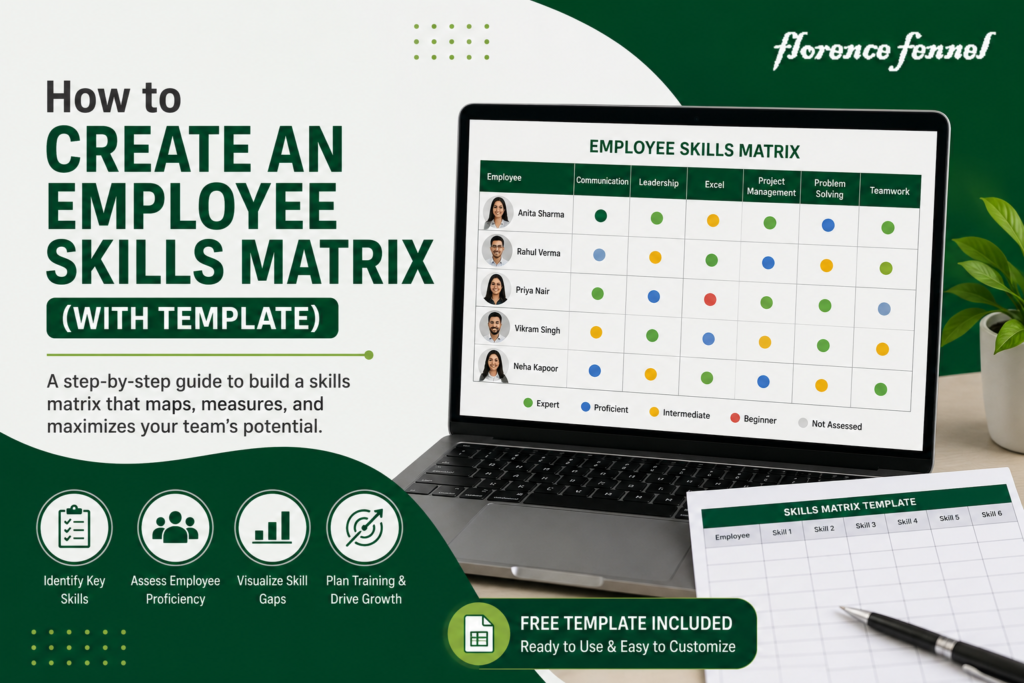
An employee skills matrix is a chart that lists your team members on one side and the skills their roles require on the other. Each cell shows how strong that person is in that skill, often using a simple scale like beginner, competent, and expert.
It’s different from a resume or a job description. A resume shows history. A skills matrix shows current, verified ability, side by side across the whole team. Managers use it to plan projects, HR uses it to plan training budgets, and employees use it to see exactly what to learn next to move up.
Why an Employee Competency Matrix Matters
A well-built employee competency matrix gives managers a fast, visual answer to questions that used to take hours to research.
- Instantly see who can cover a project if someone leaves or goes on leave
- Spot skill gaps before they turn into missed deadlines
- Plan training budgets around real, documented needs
- Support fairer promotion decisions, based on skill evidence rather than gut feel
- Make onboarding faster, since new hires know exactly what to learn first
These benefits compound over time. Once a team has even six months of matrix data, patterns start showing up that would be nearly impossible to spot from memory alone, like a whole department quietly weak in one specific skill everyone assumed someone else had covered.
How to Create Employee Skills Matrix: Step-by-Step
- List the roles and skills that matter. Start with the skills each role actually needs to do its job well, not a wish list of every possible skill. Talk to a few high performers in each role to check your list is realistic.
- Choose a rating scale. A simple 1-4 scale (no experience, basic, proficient, expert) works for most teams. Write a one-line definition for each level, so a “3” means the same thing across different managers.
- Collect the data. Combine self-ratings with manager sign-off, and add test results or certifications where you have them. Give employees a chance to explain their rating, since context often changes the score.
- Build the grid. Put employee names down the rows and skills across the columns, then fill in each score. A spreadsheet works fine to start; dedicated software helps once the team grows past a handful of people.
- Color-code the results. Use colors to flag critical gaps, so the matrix is easy to read at a glance. Red for missing skills, yellow for developing, and green for proficient is a common, simple system.
- Share it with managers. A matrix only helps if the people making staffing and training decisions actually use it. Walk managers through how to read it during a short training session.
- Update it regularly. Skills change as people learn and projects shift, so review the matrix every few months, and immediately after any major training or certification.
Who Should Own the Matrix?
HR usually owns the overall framework and rating definitions, but managers should own the day-to-day updates for their own teams. This split keeps the matrix consistent company-wide while still reflecting what’s actually happening on the ground.
Skill Matrix Template You Can Copy
A basic skill matrix template only needs a few columns to be useful. Here’s a simple layout:
| Employee | Skill A | Skill B | Skill C | Overall Readiness |
|---|---|---|---|---|
|
Employee 1 |
Expert | Proficient | Basic | Ready |
|
Employee 2 |
Proficient | Basic | No Experience |
Needs Training |
| Employee 3 | Basic | Expert | Proficient |
Ready |
| Employee 4 | No Experience | Basic | Basic |
Needs Training |
Swap in your own skills and rating labels, and this template scales from a five-person team to an entire department.
Skills Matrix for Employees vs. Skills Assessment Matrix
These two terms often get mixed up, but they serve slightly different purposes.
A skills matrix for employees is mainly a tracking tool. It’s a living record you update as people grow.
A skills assessment matrix leans more toward evaluation, often tied to a specific testing event, like a certification exam or an annual review. Many teams use an assessment matrix to generate the scores, then feed those scores into their ongoing tracking matrix.
Tips and Best Practices
- Keep the skill list focused on 8 to 15 core skills per role, rather than trying to track everything.
- Use consistent rating definitions across the company, so a “3” means the same thing in every department.
- Refresh scores after major projects, not just once a year.
- Pair the matrix with a workforce skills matrix view at the department level, so leaders see patterns across teams, not just individuals.
- If manual updates start eating your time, a platform like Florence Fennel can keep the matrix current automatically as employees complete training.
- Link the matrix to real career paths, so employees can see which skills to build next to reach their next role.
- Review the matrix during hiring decisions too, not just training planning, since it can reveal whether a new hire would fill a real gap or duplicate an existing strength.
Common Mistakes to Avoid
- Making the matrix too detailed, which discourages anyone from keeping it updated.
- Letting only one person self-rate without any manager or peer check.
- Building the matrix once and never revisiting it.
- Using vague skill names like “communication” instead of specific, observable behaviors.
- Keeping the matrix hidden from the managers who need it most.
- Treating low scores as a punishment rather than a starting point for a development plan, which discourages honest self-reporting.
ALSO READ: AI Training for Corporate Employees
Conclusion
An employee skills matrix turns scattered knowledge about who can do what into one clear, shareable picture. It replaces guesswork with evidence, whether you’re planning a project, budgeting for training, or deciding who’s ready for a promotion. Start small, pick your core skills, and build the grid this week.
Once it’s live, review it every quarter so it keeps working for you as your team grows and changes. The earlier you start tracking, the more useful the data becomes.